 CarSignal
Estimates live on a vehicle's issue. Open the issue and add line items; the totals, taxes, and fees compute as you go.
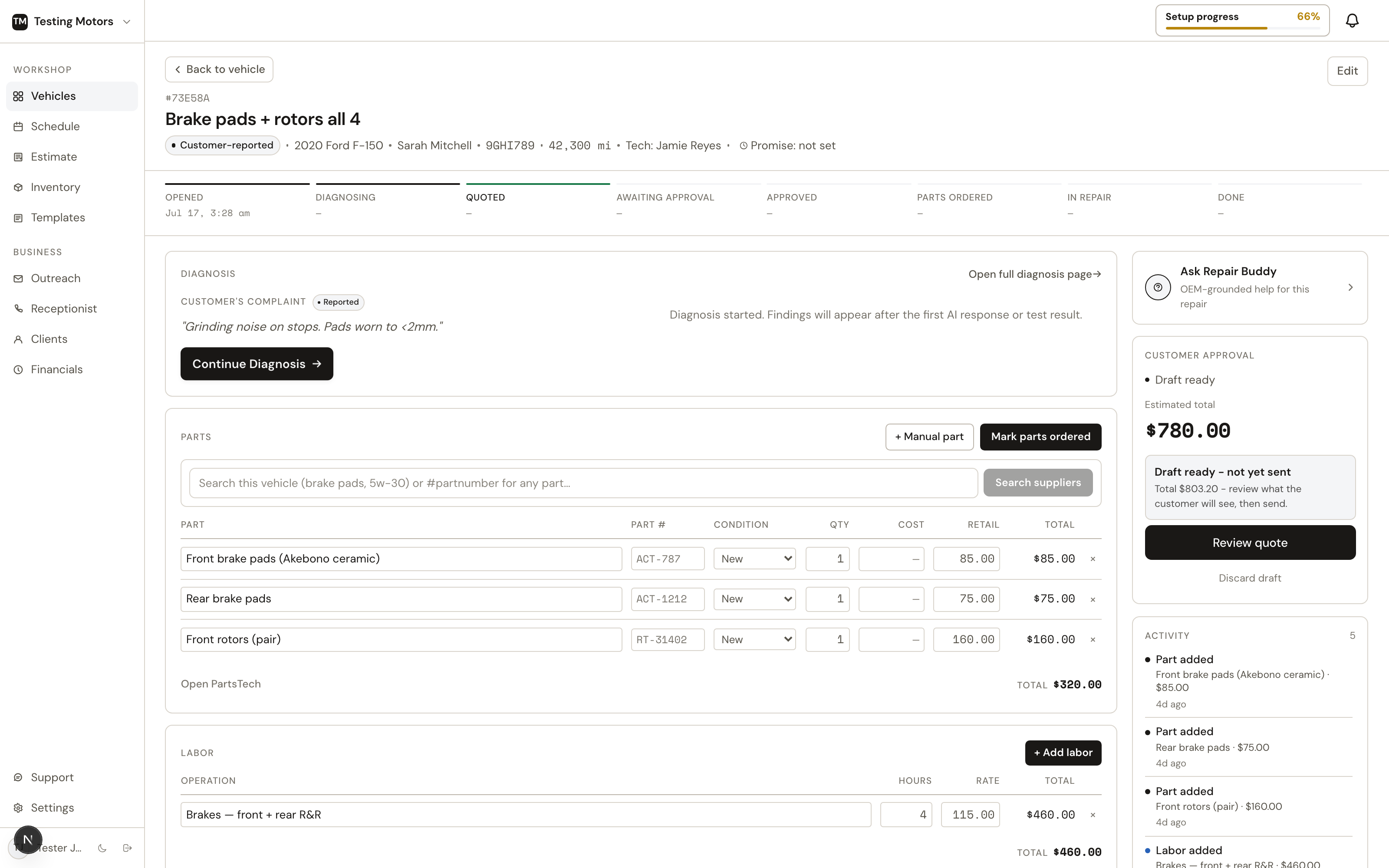
Line items
Every line is a part, labor, or a charge:
- Parts come from three places: typed by hand, pulled from your inventory, or ordered through PartsTech with cost and retail filled in by your parts matrix. Typing a cost fills the price from the matrix, and a price you typed yourself stays put when the cost changes later; a small Reset to markup link under the price brings the matrix price back when you want it. Negative numbers are refused in cost and quantity, and the previous value stays.
- Labor is entered by hand or pulled from the MOTOR labor guide, which every shop gets through CarSignal's own license. Quoted hours round up to the next half hour.
- Charges cover money that is neither: sublet work, storage, disposal. Add one on the job with the "+ Charge" button, or straight from the vehicle page: New issue, pick Charge, type the description and amount. A standalone charge lands as its own line on the vehicle. Each charge picks taxable or not, is never touched by discounts, and can record what you paid a sublet vendor so your profit numbers stay honest — that cost never prints for the customer. Mobile-service shops also get a Travel preset: miles times your rate per mile, printed on the quote and invoice as "50 × $2.00" so the customer sees exactly what the trip cost.
- Fluids like oil and coolant use the vehicle's book capacities and grades (MOTOR's licensed fluid data where the manufacturer publishes it, book data otherwise), so quantities and specs are right without looking them up.
Templates
Canned jobs drop a full service onto the estimate with parts and labor pre-filled: oil changes, brake jobs, mileage services, whatever your shop does often. Build them once on the Templates page, then add them in one click at check-in or on the issue.
With PartsTech connected, template parts written in plain words ("oil filter", "coolant") match to the exact part for that vehicle. Fluids are held to the manufacturer's spec and the book fill quantity — a coolant flush quotes the right chemistry and enough jugs for the whole system. When a supplier listing does not say its jug size or whether it is premixed, the line is still priced, as 1-gallon premixed jugs, and the note says exactly which assumption was made so you can correct it before ordering.
A template's labor can be several named lines, not just one number: "Mount & balance 1.0h + Road test 0.3h" each land as their own labor line at your shop rate. A single line with blank hours keeps using book time for each vehicle.
Tire work bills per tire, so labor lines and charges both have a per tire toggle: store the book's 0.5h-per-tire and the $1.75-per-tire fee once, and the job starts at your template's tire count — then rescales itself to the tires actually sourced. Sell 2 instead of 4 and the labor hours and per-tire charges follow automatically when the PartsTech cart lands. On tire jobs, automatic book-time labor deliberately stays off: the labor guide's tire operations are timed per single tire, and prefilling one tire's time against a set is exactly the miss that underbills a shop. Per-tire lines are the tire-labor path; without them the job shows zero labor and asks, never a wrong number.
Templates can also carry set charges: money the job always adds at an amount you choose, like a tire disposal fee or a road hazard charge. A charge can be per tire — the California tire fee stores as $1.75 per tire and bills once for every tire on the job, 4 on a set and 1 on a single — and lands as its own line on the quote and the bill, taxable or not per charge, never re-priced or AI-sourced. Charges apply whether the template is flat-priced or itemized, so a flat tire package still adds its disposal fee on top.
A template does not need every part priced, or even listed. A tire shop's "Tire install" can be just the mount-and-balance labor plus a disposal charge — the tires themselves get added per car, since they change every time. Leave a part's price blank and it is priced per vehicle when the job is applied.
The Templates page lists every job template with its labor, part count, charge total, and flat price, and every inspection checklist with its item counts. Search across both, filter to Jobs or Inspections, and duplicate any template to use it as a starting point.
AI drafting
For most jobs you do not have to build the estimate at all. AI estimates draft the line items, labor hours, and fair part prices from the diagnosis or the service request, and you edit from there.
What you make on it
While a job is still an estimate, the right rail shows Expected profit under the ask: revenue minus parts cost, tech pay and charge costs, with the margin and, from one labor hour up, profit per hour. The Send quote screen repeats it beside the delivery choices, so you know what the job earns before it goes out. Approved work keeps its own profit block. Both need part costs to be set; until then the line says so instead of guessing. Only roles with money access see either.
Preview before sending
Preview shows exactly what the customer will see on their phone: the plain-English report, the itemized cost, and the approve button. Every customer-facing sentence can be edited inline, or rewritten by AI, before anything sends.
Next: Sending quotes.